Page 1 of 10
HDR Shot's
Posted: Tue Feb 12, 2008 6:47 pm
by dino
Tried out HDR pics this weekend, HDR is a technique by which you take 1 perfectly exposure picture, 1 under and 1 over exposed by usually + or - 2 F-stops.
Then using some HDR software you merge all 3 images and then tone map the one image. This gives a more realistic picture and is a lot closer to what the human eye see's.
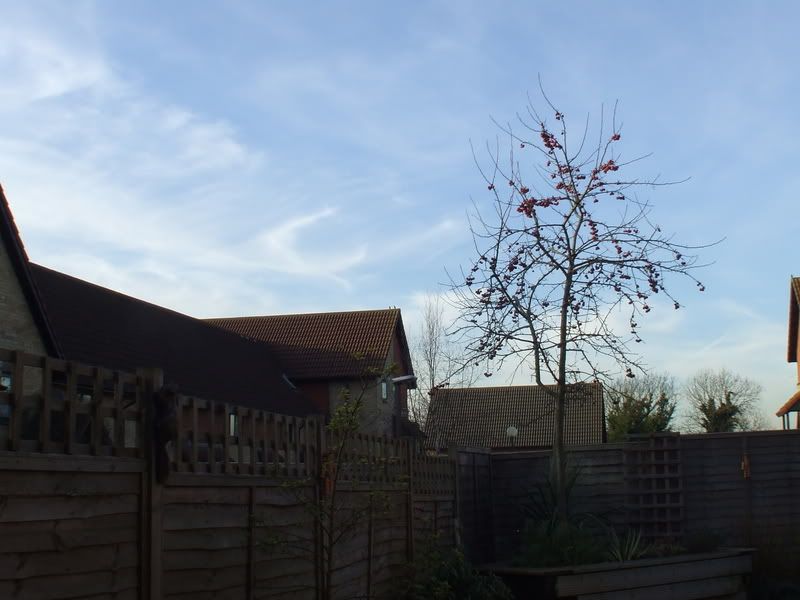
This is the "perfectly" exposed picture;
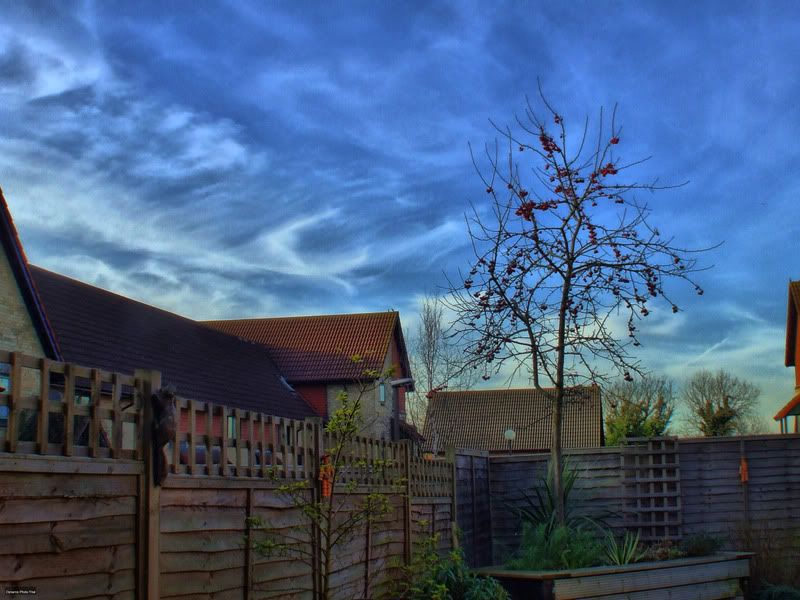
This is the same picture but in HDR;
Feel free to add your own!
Posted: Tue Feb 12, 2008 7:08 pm
by Josh_polo
Posted: Tue Feb 12, 2008 7:58 pm
by M@Turner
The second picture looks awesome!

Quite spooky sky with vivid colours!!!
As for it looking more like what the human eye would....i'd say it didn't! First picture looks more realistic!
Posted: Tue Feb 12, 2008 8:45 pm
by dino
M@Turner wrote:The second picture looks awesome!
Quite spooky sky with vivid colours!!!
As for it looking more like what the human eye would....i'd say it didn't! First picture looks more realistic!
I don't agree, i think the second pic is definitely more what the eye would see, the colours are as you'd see them, the bright sky makes the rest of the garden too dark and doesn't capture the colours in the garden. They are slightly exaggerated but still more what the human eye would see.
Posted: Tue Feb 12, 2008 9:13 pm
by M@Turner
hmm, maybe you're right! But when you look at something like that, you take everything in as a whole, the colours of the sky, roof, fence all effect how the other looks! If you blanked out the effect of the other colours on the fence for example, thats prbably how the fence's colour would look!!!
Do think the blue sky is slightly OTT. Sure i aint seen sky that deep blue!
Posted: Tue Feb 12, 2008 10:20 pm
by Polo96CL
ha, funny I noticed this thread as a work mate was showing one of my coleagues the same technique. The photo looks great btw, odd image when edited and really makes people confused.
Posted: Tue Feb 12, 2008 10:27 pm
by h4r1s
that looks wicked mate, how is it done? with an SLR i'm guessing
Posted: Tue Feb 12, 2008 11:02 pm
by ModifiedMadness
No, Dean uses a Fuji iirc point and shoot, just need to change exposure as he says above

Posted: Tue Feb 12, 2008 11:21 pm
by shantybeater
the second one definately brings out the colours more & the sky looks really cool, you should try taking a photo of your car, it may make the reflections of the sky look sweet!!! but its definately not more 'realistic'
take the same photo of your car & see what it looks like, that will be well interesting....
Posted: Wed Feb 13, 2008 4:03 am
by Tim_GTi
Haha thats really weird for me too, was talking bout this in film tech at uni today!
I'm really into the whole technique, never had the time to try it out properly yet tho

Posted: Wed Feb 13, 2008 9:15 am
by dino
h4r1s wrote:that looks wicked mate, how is it done? with an SLR i'm guessing
I use a Fuji S5600. Just set the camera up to take 3 shots using bracketing which will take 3 shots at -2, 0 and +2 exposure. You can also do it manually using the Aperture priority setting.
Will try some of the car as soon as i can!
Posted: Wed Feb 13, 2008 12:25 pm
by h4r1s
wicked i got the fuji 5800 so should have the same setting somewhere, cheers for that

Posted: Wed Feb 13, 2008 1:56 pm
by DanDiesel
the second shot is cool mate! really useful technique if your struggling to get the shot you want! gonna have to try it on my dslr.
Posted: Thu Feb 14, 2008 11:23 pm
by JoeG07
wow im definatly gonna try this it looks immence! i reckon if the sky was a bit less vivid it wld look more realistic, the garden does look a lot more real to me
Posted: Fri Feb 15, 2008 12:43 am
by JoeG07


