Page 1 of 1
trip on AID
Posted: Sun Dec 08, 2019 11:43 pm
by fletch555
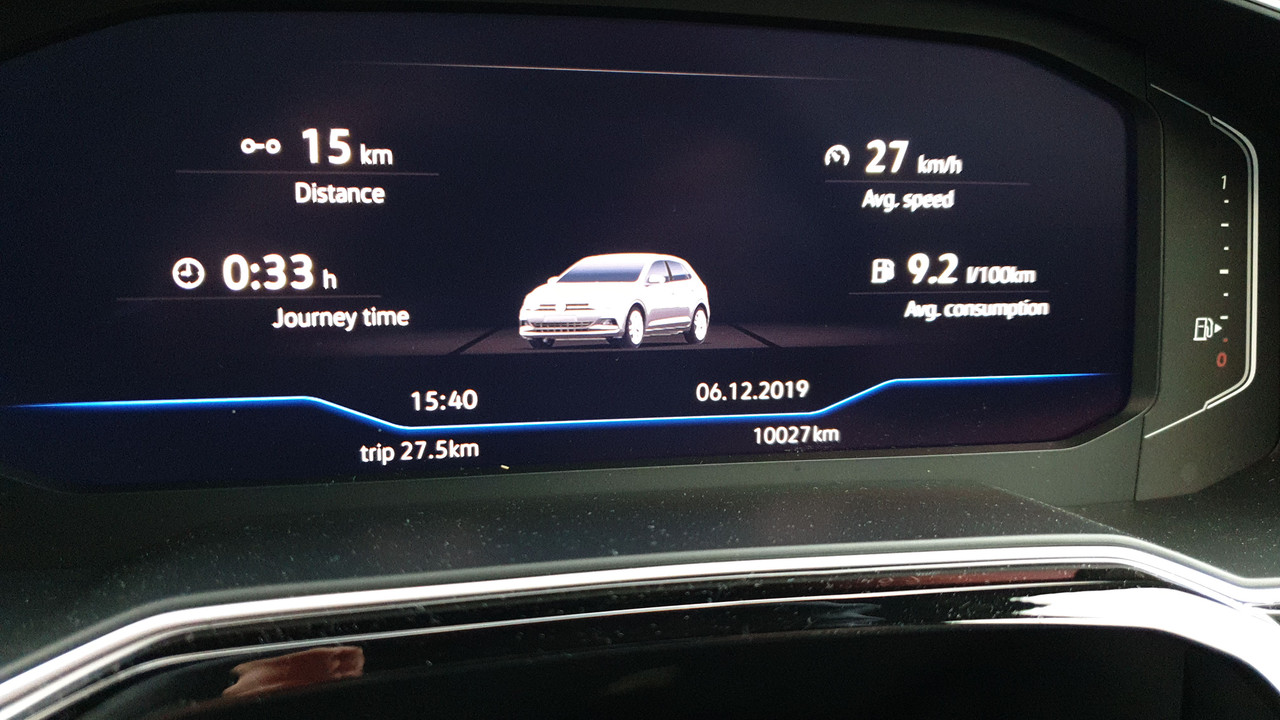
Stupid question maybe but what does
trip 27.5 at the bottom right of the screen refer to? On the AID, I never have to reset the trip computer like on traditional instruments as it does it all for ya when you fill up. It's not the distance for the journey as the above was 15kms. It's not the distance since the last fill. It seems to be the distance since I hit 10,000km. Confused

Re: trip on AID
Posted: Mon Dec 09, 2019 12:21 pm
by fletch555
Nobody?
Re: trip on AID
Posted: Mon Dec 09, 2019 2:05 pm
by proalves
I think the car resets itself after a certain distance, I remember reading it anywhere just do not know where ...

Re: trip on AID
Posted: Mon Dec 09, 2019 2:30 pm
by roywolfey
It's your trip mileage..
It's synced with main odometer from new, so if you never reset it, it will count up with the main mileage up to 9999 and then back to 0 every 10K KM/Miles.
To use it's intended functionality, scroll down the Driving Data using the up and down arrows on the right hand side of the steering wheel until you find 'TRIP' Click OK and it will display the current trip mileage as in your main view.
Holding down OK resets the trip meter back to zero. It will then increment once more until the next time you reset it.
Re: trip on AID
Posted: Thu Dec 12, 2019 1:10 pm
by tom.wright
Does anyone know if it's possible to change that Trip readout so it shows miles since last refuelling stop or miles since start? I read somewhere it could be done but can't seem to work out how.
Re: trip on AID
Posted: Fri Dec 13, 2019 9:28 am
by fletch555
roywolfey wrote: Mon Dec 09, 2019 2:30 pm
It's your trip mileage..
It's synced with main odometer from new, so if you never reset it, it will count up with the main mileage up to 9999 and then back to 0 every 10K KM/Miles.
To use it's intended functionality, scroll down the Driving Data using the up and down arrows on the right hand side of the steering wheel until you find 'TRIP' Click OK and it will display the current trip mileage as in your main view.
Holding down OK resets the trip meter back to zero. It will then increment once more until the next time you reset it.
Thanks for that! You are correct.