
These sell for £115 on eBay.
Looking for £80
If your interested, please email me at: [email protected]
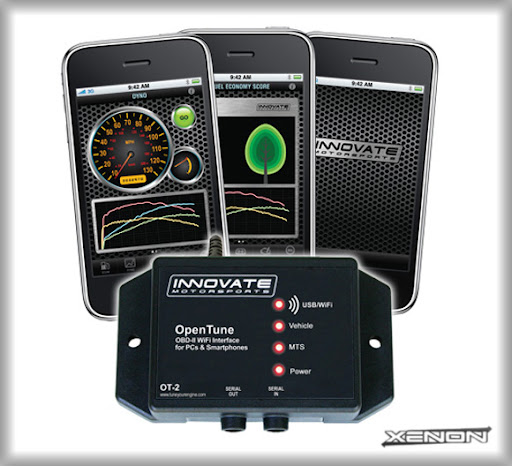
Brand new in the box
100% authentic Innovate products
PART# 3831
What is the OT-2?
The OT-2 is a simple device that wirelessly connects your iPhone, iPod Touch or WiFi PC to your vehicle. When used with the free Logworks Mobile app, DashCommand for iPhone/iPod Touch by Palmer Performance (Available on the Apple App Store) or LogWorks 3 for PC, the OT-2 transforms your device into a wireless:
- Gauge or digital dash
- Data logger
- Dyno
- OBDII Scan Tool
- Efficiency Meter

FEATURES:
- OBD-II interface for any late model car- ISO 15765 (CAN), J1850 (Ford, GM), ISO 9141, and ISO 14230 (kwp2000)
- Wi-Fi communication from OT-2 Interface to Apple TM iPhone, iPod Touch or WiFi PC
- Compatible with all Innovate MTS (Modular Tuning System) devices, including LC-1 “Lambda Cable” Air/Fuel Ratio sensor controller, LM-2 Air/Fuel Ratio meter with analog inputs, TC-4 4-channel thermocouple interface, and more.
INNOVATE OT-2 MANUAL IN ENGLISH
LogWorks Mobile (free):
LogWorks Mobile TM software (a FREE application available on the Apple app store) features the following functionality:
- Performance Meter – 0-60 acceleration, HP calculation, Acceleration G’s, Timer (1/8 mile, 1/4 mile, and more.)
- Efficiency Meter - Interactive efficiency calculator (MPG, GPM, and AES) Advanced Diagnostics – Record and analyze critical vehicle parameters. Read and clear DTCs (Diagnostic Trouble Codes). OT-2 required. Performance and Efficiency functions work without OT-2, however data quality and accuracy is dramatically better when utilizing the OT-2.


LogWorks Mobile can be used without the OT-2 as a free dyno and efficiency meter. When combined with the OT-2, the dyno and efficiency features are significantly improved while also adding wireless gauge, OBDII scan tool and data logging capability.
click here to download free app
DashCommand:
DashCommand for iPhone/iPod Touch by Palmer Performance (Available on the Apple App Store).
- Diagnose engine trouble, read and reset your check engine light.
- The inclinometer functions as both a tilt meter and a slope meter. Give yourself a little more confidence when off road, showing the roll and pitch attitude of your vehicle. Handy in terrain where the horizon is not horizontal or when wheeling at night and you can't get a good visual reference. Easily toggle between two different modes of display.
- A fully configurable dash designed to give you more information than stock instrument cluster.


- Visually maps out your path as you drive around the race track. Displays your current location and whether you are accelerating or braking in clear and easy to see colors. Visually analyze different race track laps to see how acceleration and braking changed from lap to lap.
- Professional skidpad showing real-time lateral, acceleration, and braking G forces. Clearly marked G-force circle visually plots the G forces and keeps a record that you can instantly understand. It also features indicators showing your maximum left, right, acceleration, and braking G forces.
How does it work?
The OT-2 utilizes your vehicles existing On-Board Diagnostic system (1996 and up OBD-II) to access "hidden" information. This process is completely safe and is currently utilized by all factory service technicians. A single plug, usually located under the dashboard, feeds information to the OT-2 device that wirelessly communicates to your iPhone or iPod Touch through the FREE Logworks Mobile application or DashCommand.
Will it work on my vehicle?
The OT-2 works on over 95% of vehicles manufactured after 1996. Any vehicle manufactured in 1996 or prior utilizes a different On-Board Diagnostic system that is incompatible with the OT-2 device.
Is it easy to install?
YES!!! The OT-2 can be installed in under 2 minutes by almost anyone in 4 simple steps:
1. Download the FREE LogWorks Mobile App or purchase DashCommand by Palmer Performance onto your iPhone or iPod Touch, available in the iTunes app store.
2. Plug in the OT-2 to your vehicles On-Board Diagnostic (OBDII) port (usually under the driver's side dashboard).
3. Connect to the OT-2's WiFi signal
4. Launch the Mobile App and enjoy!
Logworks 3 for WiFi PC's:

LogWorks is a software application that interfaces with the Innovate Modular Tuning System
products. It enables easy analysis and manipulation of engine data acquired by MTS components
and also allows to view engine data in real-time on the on-screen virtual gauges.
This manual describes the basics of data logging with the Innovate Modular Tuning System and
how to use the LogWorks 3.0 Program. In addition this manual shows how you can extend the
capabilities of the MTS with some basic electronic skills.
Computer Requirements
Operating System Windows 98 or later
Computer speed 600MHz Pentium 1 or faster
RAM Min. 100 Mbyte more than recommended for the
operating system
Hard Disk space Min. 100 Mbyte free space
Display Thousands of colors, 800 x 600 Min.
Other 1 free serial port or USB to serial adapter
The LogWorks application is used to record, display and analyze engine or car data. Natively it provides six different “views” of the data:
1. Main Dashboard
This view displays the current engine data (real-time data) in “gauges”. Similar to a car’s dashboard. The gauges are configurable in many ways. This view is active whenever LogWorks receives engine data, whether the data is being logged or not.
2. Time Trace Log View
This is the main view of a datalog. A datalog is a collection of engine data, sorted by recording time. The data in the Time Trace Log View (Log Window) is shown graphically and can be analyzed in many ways. During recording with LogWorks this view is updated automatically as new data arrives.
3. Playback View
This is a sub-view of the Time-Trace Log View when the log is played back. This view is similar to the Main Dashboard View, but shows the recorded engine data in it’s time sequence when playing back.
4. X-Y Plot View
In this View the logged engine data is shown in its dependency of another channel. A common example is to plot AFR as dependent on RPM. But any channel data
combination can be used. The X-Y Plot view also allows viewing and analyzing the data in different ways. This view is NOT automatically updated during recording.
5. 3D Chart View
In this View the logged engine data is analyzed and shown in its dependency of two other channels. A common example is to show AFR data as dependent on RPM and engine
load. But any channel combination can be used. This view sorts the engine data into
different fields. The spacing and number of field columns and rows is user adjustable so it for example fits the spacing and number of how a fuel injection’s fuel tables are stored.
This view is automatically updated during recording and provides many analyzing
functions.
6. Channel Statistics View
In this view a single channel is analyzed and its statistical distribution during a recording session is shown. This view is NOT automatically updated during recording.


download Logworks 3 and Manual
How does it work?
The OT-2 utilizes your vehicles existing On-Board Diagnostic system (1996 and up OBD-II) to access "hidden" information. This process is completely safe and is currently utilized by all factory service technicians. A single plug, usually located under the dashboard, feeds information to the OT-2 device that wirelessly communicates to your PC through the Logworks 3 application.
Will it work on my vehicle?
The OT-2 works on over 95% of vehicles manufactured after 1996. Any vehicle manufactured in 1996 or prior utilizes a different On-Board Diagnostic system that is incompatible with the OT-2 device.
Is it easy to install?
YES!!! The OT-2 can be installed in under 2 minutes by almost anyone in 4 simple steps:
1. Download the LogWorks 3 onto your PC.
2. Plug in the OT-2 to your vehicles On-Board Diagnostic (OBDII) port (usually under the driver's side dashboard).
3. Connect to the OT-2's WiFi signal
4. Launch the LogWorks 3 and enjoy!
See: http://www.ot-2.com/ for more information