6R 1.6TDI 90HP CAYB 2009

Chat about your 6R/6C model Polos here!
User avatar
ciclo
Bling Bling Diamond Member
Posts: 8837
Joined: Sun Feb 24, 2013 10:20 am
Drives: 6R'13/G7.5'19
Location: Earth ♥, Spain.
Contact:

Re: 6R 1.6TDI 90HP CAYB

Post by ciclo »

No.
I bought a similar carstyle4you buttons, but did not like me and were disassembled.
Image
User avatar
Ugabista
Bronze Member
Posts: 194
Joined: Thu Oct 16, 2014 3:14 pm
Drives: Vw Polo 6R 1.6TDI 90CV CAYB
Location: Portugal

Re: 6R 1.6TDI 90HP CAYB

Post by Ugabista »

ciclo wrote:No.
I bought a similar carstyle4you buttons, but did not like me and were disassembled.
Image
The button color looks slightly different, that's why you exchanged or worked badly :?:
User avatar
ciclo
Bling Bling Diamond Member
Posts: 8837
Joined: Sun Feb 24, 2013 10:20 am
Drives: 6R'13/G7.5'19
Location: Earth ♥, Spain.
Contact:

Re: 6R 1.6TDI 90HP CAYB

Post by ciclo »

Ugabista wrote: The button color looks slightly different, that's why you exchanged or worked badly :?:
By the tonality of color.

===============================
In reference to your private message about installing the DRL (foglamps) in your POLO (with DRL headlights).

The first thing you should consider is the reference number BCM. Highly probably yours is 6R0937087 ?, so your future DRL can not be controlled by your BCM.

Knowing this, you need:
(for example)
wiring: http://www.ebay.de/itm/VW-Polo-6R-ab-20 ... 2c60a80df7

Fog lights with drl: http://www.ebay.de/itm/VW-Polo-6R-Nebel ... 2c5fec093d

Bulbs 2x: P21W

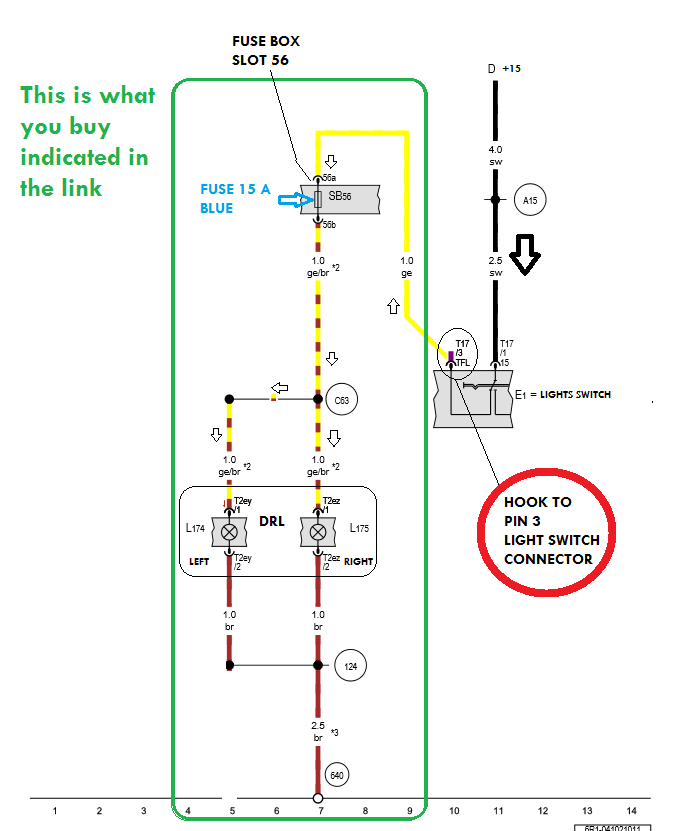
Installation (in your case) is very simple:

Image

It is very easy, please do not ask me till you have any difficulties during installation. I receive many messages, one question after another, many of them (simple questions Image) can be solved by searching Saint google. Thank you very much. Image

This diagram is like a map, just follow the arrows. The electric current is like a river you have to follow to get from one point to another. In this case the light switch would be a floodgate you open or shut when you want or need. :mrgreen:
User avatar
Ugabista
Bronze Member
Posts: 194
Joined: Thu Oct 16, 2014 3:14 pm
Drives: Vw Polo 6R 1.6TDI 90CV CAYB
Location: Portugal

Re: 6R 1.6TDI 90HP CAYB

Post by Ugabista »

ciclo wrote:
Ugabista wrote: The button color looks slightly different, that's why you exchanged or worked badly :?:
By the tonality of color.

===============================
In reference to your private message about installing the DRL (foglamps) in your POLO (with DRL headlights).

The first thing you should consider is the reference number BCM. Highly probably yours is 6R0937087 ?, so your future DRL can not be controlled by your BCM.

Knowing this, you need:
(for example)
wiring: http://www.ebay.de/itm/VW-Polo-6R-ab-20 ... 2c60a80df7

Fog lights with drl: http://www.ebay.de/itm/VW-Polo-6R-Nebel ... 2c5fec093d

Bulbs 2x: P21W

Installation (in your case) is very simple:

Image

It is very easy, please do not ask me till you have any difficulties during installation. I receive many messages, one question after another, many of them (simple questions Image) can be solved by searching Saint google. Thank you very much. Image

This diagram is like a map, just follow the arrows. The electric current is like a river you have to follow to get from one point to another. In this case the light switch would be a floodgate you open or shut when you want or need. :mrgreen:
Well friend, before too thanks for your answer.

My BCM is the 6R0 937 087D.

The diagram is perfect but there is a small problem here, I have AUTO Lights like you, how will? Work?

Image

It will not be possible to connect the cable coming out of the new foglamps on site which is now connected the wire to be connected to pin 3 (TFL) in BCM?

Type this ... loooool

Image

Thank help and opinions.
User avatar
ciclo
Bling Bling Diamond Member
Posts: 8837
Joined: Sun Feb 24, 2013 10:20 am
Drives: 6R'13/G7.5'19
Location: Earth ♥, Spain.
Contact:

Re: 6R 1.6TDI 90HP CAYB

Post by ciclo »

Ugabista wrote:
ciclo wrote: Highly probably yours is 6R0937087 ?, so your future DRL can not be controlled by your BCM.
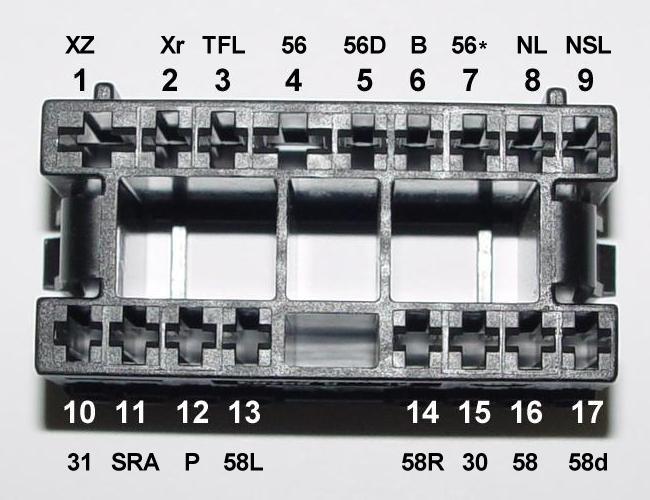
All you have to do is hook in the PIN 3 lights switch connector.

Image

==============================
Your automatic lights are similar ... (chinesse module) :)
No matter, you hook to PIN3 original connector.
You have not read my previous post ... :lol:
Last edited by ciclo on Mon Feb 02, 2015 2:48 am, edited 1 time in total.
User avatar
Ugabista
Bronze Member
Posts: 194
Joined: Thu Oct 16, 2014 3:14 pm
Drives: Vw Polo 6R 1.6TDI 90CV CAYB
Location: Portugal

Re: 6R 1.6TDI 90HP CAYB

Post by Ugabista »

ciclo wrote:
Ugabista wrote:
ciclo wrote: Highly probably yours is 6R0937087 ?, so your future DRL can not be controlled by your BCM.
All you have to do is hook in the PIN 3 lights switch connector.

Image

==============================
Your automatic lights are similar ... (chinesse module) :)
No matter, you hook to PIN3 original connector.

Sometimes ... It's frustrating for me ...
You have not read my previous post ... Image :lol:
I have read and reread your previous post several times, which I realized was that as I have a BCM 6R0937087?(D) can not be controlled by the BCM. :)
What you're telling me is that connecting directly to pin 3 (TFL) will control all the lights (daytime and medium) but manually, right?

What I asked was something else, that is, no one could 'circumvent' the BCM connecting the wire from the new foglamps on site (port x in BCM) going after this to pin 3 (TFL) lights switch, this so that it was possible to be automatically switched. This will be totally impractical?

Yes, my module is Chinese.
User avatar
ciclo
Bling Bling Diamond Member
Posts: 8837
Joined: Sun Feb 24, 2013 10:20 am
Drives: 6R'13/G7.5'19
Location: Earth ♥, Spain.
Contact:

Re: 6R 1.6TDI 90HP CAYB

Post by ciclo »

From factory there are five different electrical installations daytime running lights depending on equipment and model POLO 6R.
Due to joins between; halogen headlights, fog lights, static cornering lights, xenon headlights and BlueMotion.

Your BCM does not have the necessary pins to control the DRL. Your BCM has no function in this case, forget your BCM.

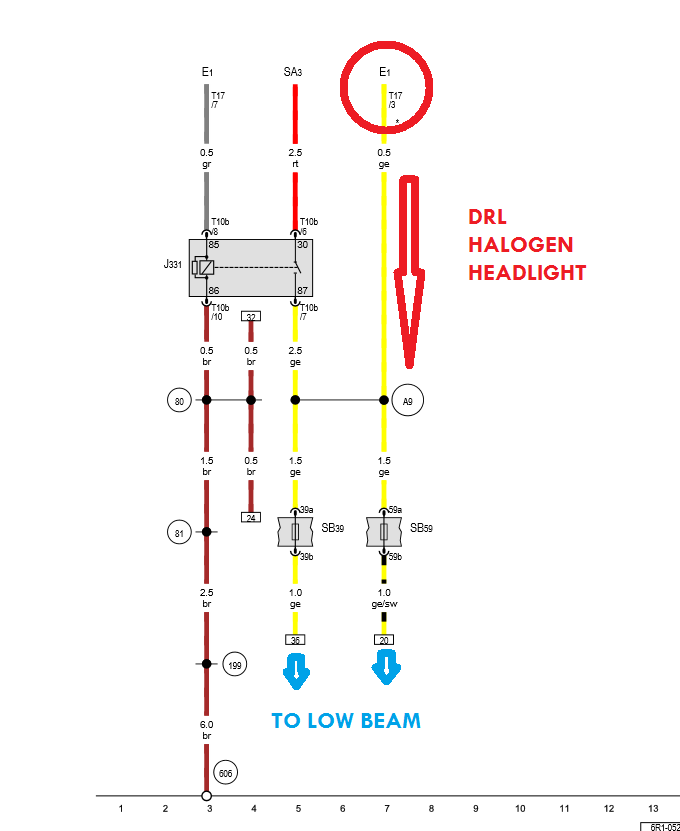
Your daytime running lights factory is a simple wire connected to the low beam, so the scheme you drew above is wrong.
This is your electrical installation factory for DRL: (marked in red)
Image

The only way you have to install daytime running lights on additional lamp (foglights) is:
Connect to PIN3 original lights switch connector and from here to additional lamps (foglights) interposing a 15 amp fuse. Your original wire for DRL should be isolated (cloth tape).
Exactly as I said in my diagram.

This way your DRL on additional lamps will work seamlessly and automatically.

I said you had the Chinese module for automatic lights because if it were otherwise your future DRL would be connected differently, no other intentions ...

Tell me,
Why you invented that diagram you drew?
Why you thought your original drl were connected to the BCM?
Do you think it would have been necessary all these messages if you had done what I told you at first?
Last edited by ciclo on Mon Feb 02, 2015 2:51 am, edited 1 time in total.
User avatar
Ugabista
Bronze Member
Posts: 194
Joined: Thu Oct 16, 2014 3:14 pm
Drives: Vw Polo 6R 1.6TDI 90CV CAYB
Location: Portugal

Re: 6R 1.6TDI 90HP CAYB

Post by Ugabista »

ciclo wrote:From factory there are five different electrical installations daytime running lights depending on equipment and model POLO 6R.
Due to joins between; halogen headlights, fog lights, static cornering lights, xenon headlights and BlueMotion.

Your BCM does not have the necessary pins to control the DRL. Your BCM has no function in this case, forget your BCM.

Your daytime running lights factory is a simple wire connected to the low beam, so the scheme you drew above is wrong.
This is your electrical installation factory for DRL: (marked in red)
Image

The only way you have to install daytime running lights on additional lamp (foglights) is:
Connect to PIN3 original lights switch connector and from here to additional lamps (foglights) interposing a 15 amp fuse. Your original wire for DRL should be isolated (cloth tape).
Exactly as I said in my diagram.

This way your DRL on additional lamps will work seamlessly and automatically.

I said you had the Chinese module for automatic lights because if it were otherwise your future DRL would be connected differently, no other intentions ...

Tell me,
Why you invented that diagram you drew?
Why you thought your original drl were connected to the BCM?
Do you think it would have been necessary all these messages if you had done what I told you at first?

My time is very limited ... you exhaust my time unnecessarily (like many).
From now I will not be the villain of the movie for trying to help others. :roll:
Well, first, I thank you the help provided on this issue of daytime running lights.

Let me also tell you that some things;

Not first need to write a great letter because I have no shortage of view!
Second, if I ask is because I have doubts!
As initially mentioned, thank you to those who can help me, without thereby requiring someone to do it!
I, in my area, I have to sometimes explain things differently to several people because the thinking of each of them and how to learn is shoot from person to person, especially for those who do not dominate the area as is my case here!
The diagram did, only I did, because I was not fully clarified with the answers so far, because I like to understand why things and not be a puppet of doing so because it is so!
I did not understand your comment about my model to be Chinese in a negative way, as you are to understand!
Finally, my English is not like an English as thy neither is, you should try to be understandable in this field, in fact, as you were when you sold me the adapter to the rear camera!

Thank you and good weekend.
User avatar
ciclo
Bling Bling Diamond Member
Posts: 8837
Joined: Sun Feb 24, 2013 10:20 am
Drives: 6R'13/G7.5'19
Location: Earth ♥, Spain.
Contact:

Re: 6R 1.6TDI 90HP CAYB

Post by ciclo »

Completely agree with you, your words are very reasonable, I apologize. Good weekend
User avatar
Ugabista
Bronze Member
Posts: 194
Joined: Thu Oct 16, 2014 3:14 pm
Drives: Vw Polo 6R 1.6TDI 90CV CAYB
Location: Portugal

Re: 6R 1.6TDI 90HP CAYB

Post by Ugabista »

ciclo wrote:Completely agree with you, your words are very reasonable, I apologize. Good weekend
No problem, talking about is that we understand each other :wink:
Last edited by Ugabista on Mon Feb 02, 2015 12:16 am, edited 1 time in total.
User avatar
Ugabista
Bronze Member
Posts: 194
Joined: Thu Oct 16, 2014 3:14 pm
Drives: Vw Polo 6R 1.6TDI 90CV CAYB
Location: Portugal

Re: 6R 1.6TDI 90HP CAYB

Post by Ugabista »

Image


- Installation and connection of the banks heating buttons (1st phase)

- Voltmeter installation (Thanks for the idea and the DIY Ciclo :) )


Off car (connected Medium and Radio)
Image


Car to work (linked Middle and Radio)
Image


In this 1st stage heating buttons banks are to compose the panel of buttons, then will be to install the 2nd phase
http://www.aliexpress.com/item/free-shi ... 41475.html

voltmeter installed
http://www.aliexpress.com/item/With-she ... 50883.html


:lol:
User avatar
Ugabista
Bronze Member
Posts: 194
Joined: Thu Oct 16, 2014 3:14 pm
Drives: Vw Polo 6R 1.6TDI 90CV CAYB
Location: Portugal

Re: 6R 1.6TDI 90HP CAYB

Post by Ugabista »

I am now a problem, got a Bluetooth module (7P6 035 730 J) to connect to my RNS 315 (3C8 035 279) which have no internal Bluettoh, called the Vag-Com and I enabled the Telephone (77) in CanGateway but goes on to say me that the audio is not available although if you click MEDIA longer appear BT shaded, that once I have tried to activate some parameters in Navigation (37) but without success always giving error (error 31) not accepting the changes ... :cry:
Someone can help me in this? :(
User avatar
ciclo
Bling Bling Diamond Member
Posts: 8837
Joined: Sun Feb 24, 2013 10:20 am
Drives: 6R'13/G7.5'19
Location: Earth ♥, Spain.
Contact:

Re: 6R 1.6TDI 90HP CAYB

Post by ciclo »

Nice and useful voltmeter (IMHO). 8)
To second stage for heated seats here you have information that can help. http://www.uk-polos.net/view ... 42#p487193 (very interesting mod)
To troubleshoot Bluetooth, turn up the volume to maximum to verify that the audio is not available.
Please publishes an autoscan.
You can use "Code" when you edit an autoscan, for example: http://www.uk-polos.net/view ... 05#p473692
Select text and click on Code. :wink:
User avatar
Ugabista
Bronze Member
Posts: 194
Joined: Thu Oct 16, 2014 3:14 pm
Drives: Vw Polo 6R 1.6TDI 90CV CAYB
Location: Portugal

Re: 6R 1.6TDI 90HP CAYB

Post by Ugabista »

ciclo wrote:Nice and useful voltmeter (IMHO). 8)
To second stage for heated seats here you have information that can help. http://www.uk-polos.net/view ... 42#p487193 (very interesting mod)
To troubleshoot Bluetooth, turn up the volume to maximum to verify that the audio is not available.
Please publishes an autoscan.
You can use "Code" when you edit an autoscan, for example: http://www.uk-polos.net/view ... 05#p473692
Select text and click on Code. :wink:
Thanks for your help. :wink:

I've walked to see this 'CODE' but do not do the slightest idea of how and where to change what ... :roll:

I made a AutoScan ...

Monday,02,February,2015,10:54:14:62939
VCDS -- Windows Based VAG/VAS Emulator
VCDS Version: 12.12.0.0
Data version: 20130910


VIN: WVWZZZ6RZAY072238 License Plate: AUTOSCAN 6R


--------------------------------------------------------------------------------
--------------------------------------------------------------------------------


Chassis Type: 6R (6N0)
Scan: 01 03 08 09 15 17 19 25 37 44 56 77

VIN: WVWZZZ6RZAY072238

01-Engine -- Status: OK 0000
03-ABS Brakes -- Status: OK 0000
04-Steering Angle -- Status: OK 0000
08-Auto HVAC -- Status: Malfunction 0010
09-Cent. Elect. -- Status: OK 0000
15-Airbags -- Status: OK 0000
17-Instruments -- Status: OK 0000
19-CAN Gateway -- Status: OK 0000
25-Immobilizer -- Status: OK 0000
37-Navigation -- Status: Malfunction 0010
44-Steering Assist -- Status: OK 0000
56-Radio -- Status: OK 0000
77-Telephone -- Status: Malfunction 0010

-------------------------------------------------------------------------------
Address 01: Engine (J623-CAYB) Labels: 03L-906-023-CAY.clb
Part No SW: 03L 906 023 D HW: 03L 906 023 D
Component: 1,6l R4 CR td H13 9970
Revision: --H13--- Serial number:
Coding: 00114014000400080000
Shop #: WSC 15628 784 95450
ASAM Dataset: EV_ECM16TDI02103L 003009
ROD: N/A
VCID: 275D1D175E18CF26F59-8072

No ASAM data for: "EV_ECM16TDI02103L" (VW36 *)
No fault code found.
Readiness: 0000 0000

-------------------------------------------------------------------------------
Address 03: ABS Brakes (J104) Labels: 6R0-907-37x-ESP82.clb
Part No SW: 6R0 907 379 R HW: 6R0 907 379 R
Component: ESP8.2i front H04 0002
Revision: --------
Coding: 210228E3417400B4842714E582D900421300
Shop #: WSC 02069 000 00000
VCID: 4D918FBF1024C5762F5-8018

No fault code found.

-------------------------------------------------------------------------------
Address 08: Auto HVAC (J301) Labels: 6R0-820-045.clb
Part No SW: 6R0 820 045 E HW: 6R0 820 045 E
Component: Climatic 24 0600
Revision: 00 10 24
VCID: 306FF64B63D6889E243-8065

1 Fault Found:
16372 - Control Module; Unspecified Internal Error
014 - Defective
Freeze Frame:
Fault Status: 01101110
Fault Priority: 1
Fault Frequency: 1
Reset counter: 255
Mileage: 31090 km
Time Indication: 0
Date: 2013.14.04
Time: 21:04:20


-------------------------------------------------------------------------------
Address 09: Cent. Elect. (J519) Labels: 6R0-937-08x-09.clb
Part No SW: 6R0 937 087 D HW: 6R0 937 087 D
Component: BCM PQ25 H+4 H46 0207
Revision: BF046001 Serial number: 0147 127100851
Coding: 3CB02BBF08A10000003800007CAB0CD00000410F60860040200000000000
Shop #: WSC 00058 261 91255
VCID: 3E73D873A9826EEEA6F-806B

Subsystem 1 - Part No SW: 6R0 959 801 H HW: 6R0 959 801 H Labels: 6R0-959-801.CLB
Component: J386__TSG_FT 004 0803
Coding: 08BC30

Subsystem 2 - Part No SW: 6R0 959 802 K HW: 6R0 959 802 K Labels: 6R0-959-802.CLB
Component: J387__TSG_BT 004 0803
Coding: 08BC30

Subsystem 3 - Part No SW: 5K0 959 542 HW: 5K0 959 542
Component: E221__MFL-TAS H05 0010
Coding: 020000

Subsystem 4 - Part No SW: 6R0 959 811 B HW: 6R0 959 811 B
Component: J388__TSG_HL 004 0803
Coding: 08BC32

Subsystem 5 - Part No SW: 6R0 959 812 B HW: 6R0 959 812 B
Component: J389__TSG_HR 004 0803
Coding: 08BC32

No fault code found.

-------------------------------------------------------------------------------
Address 15: Airbags (J234) Labels: 5K0-959-655.clb
Part No SW: 6R0 959 655 C HW: 6R0 959 655 C
Component: VW10Airbag008 H09 0018
Revision: -------- Serial number: 003DW006D4RC
Coding: 003038
Shop #: WSC 124697 483 00190
ASAM Dataset: EV_AirbaVW10BPAVW250 A01001
ROD: EV_AirbaVW10BPAVW250_VW24.rod
VCID: 428BAC83D57A0A0EC27-8017

Crash sensor for side airbag; driver side:
Serial number: 3572SRB4000099D0F1BG

Crash sensor for side airbag; passenger side:
Serial number: 3582SRB4000099CCFA5V

Crash sensor for side airbag; rear driver side:
Serial number: 3516GRB401V9GRDKNJHY

Crash sensor for side airbag; rear passenger side:
Serial number: 3526GRB40239GRDL0R8S

No fault code found.

-------------------------------------------------------------------------------
Address 17: Instruments (J285) Labels: 5K0-920-xxx-17.clb
Part No SW: 6R0 920 861 B HW: 6R0 920 861 B
Component: KOMBI H23 0110
Serial number: 00000000000000
Coding: 140A00
Shop #: WSC 15628 784 95450
ASAM Dataset: EV_Kombi_UDS_VDD_RM09 A04040
ROD: EV_Kombi_UDS_VDD_RM09_SE35.rod
VCID: 3467FA5B9FCEB4BE40B-8061

No fault code found.

-------------------------------------------------------------------------------
Address 19: CAN Gateway (J533) Labels: 6N0-909-901-6R.clb
Part No SW: 6N0 909 901 HW: 6R0 937 087 D
Component: GW-K-CAN TP20 0207
Coding: 002200
Shop #: WSC 00058 261 91255
VCID: F0EFB64B2356489EE43-80A5

No fault code found.

-------------------------------------------------------------------------------
Address 25: Immobilizer (J334) Labels: 5K0-920-xxx-25.clb
Part No SW: 6R0 920 861 B HW: 6R0 920 861 B
Component: IMMO H23 0110
Serial number:
ASAM Dataset: EV_Immo_UDS_VDD_RM09 A03004
ROD: EV_Immo_UDS_VDD_RM09_VN35.rod
VCID: 3467FA5B9FCEB4BE40B-8061

No fault code found.

-------------------------------------------------------------------------------
Address 37: Navigation (J794) Labels: 1K0-035-27x-37.clb
Part No SW: 3C8 035 279 HW: 3C8 035 279
Component: RNS315-EU H73 0407
Serial number: VWZAZ2N0530303
Coding: 000102710200140000008000
Shop #: WSC 02754 790 50316
ASAM Dataset: EV_RNS315EUV2UDS 001705
ROD: EV_RNS315EUV2UDS.rod
VCID: E8DFDE2B1386805EBC3-80BD

Data medium:
Subsystem 1 - Part No: 3AA 919 866
Component: EUR_W_V4 0050

2 Faults Found:
1048632 - Antenna 1 for Radio
B1119 13 [009] - Open Circuit
Confirmed - Tested Since Memory Clear
Freeze Frame:
Fault Status: 00000001
Fault Priority: 5
Fault Frequency: 1
Reset counter: 62
Mileage: 118575 km
Date: 2060.14.27
Time: 10:50:25

1048634 - Antenna 2 for radio
B111A 13 [009] - Open Circuit
Confirmed - Tested Since Memory Clear
Freeze Frame:
Fault Status: 00000001
Fault Priority: 5
Fault Frequency: 1
Reset counter: 62
Mileage: 118575 km
Date: 2060.14.27
Time: 10:50:25


-------------------------------------------------------------------------------
Address 44: Steering Assist Labels: 6Q0-423-156.clb
Part No: 6R0 423 156 A
Component: LenkhilfeTRW V275
Coding: 10130
Shop #: WSC 00000
VCID: 2E53E833EDE29E6E36F-807B

No fault code found.

-------------------------------------------------------------------------------
Address 77: Telephone (J412) Labels: 7P6-035-730.clb
Part No SW: 7P6 035 730 J HW: 7P6 035 730 J
Component: TELEFON H15 3200
Revision: 1B001001 Serial number: 00007662955777
Coding: 0611000000010110
Shop #: WSC 00015 115 12345
ASAM Dataset: EV_UHVNA 002720
ROD: EV_UHVNA.rod
VCID: 3979CB6FB8AC49D693D-806C

1 Fault Found:
9455635 - Telephone Microphone
B1048 13 [009] - Open Circuit
Confirmed - Tested Since Memory Clear
Freeze Frame:
Fault Status: 00000001
Fault Priority: 4
Fault Frequency: 1
Reset counter: 62
Mileage: 118575 km
Date: 2060.14.27
Time: 10:41:11


End ---------------------------------------------------------------------


Although I appear the radio Bluetooth menu, does not give me leave to do anything else. The sound you hear is always the radio or SD card, it never switches to Bluetooth. In the second photo the BT is shaded.

Image


- The climatic error could never erase, back forever, but I do not know what it is because the climatic seems to work well.
- The errors of navigation seems to be the antenna, loose connection maybe.
- The telephone will not know why, the microphone seems to me well connected.
User avatar
ciclo
Bling Bling Diamond Member
Posts: 8837
Joined: Sun Feb 24, 2013 10:20 am
Drives: 6R'13/G7.5'19
Location: Earth ♥, Spain.
Contact:

Re: 6R 1.6TDI 90HP CAYB

Post by ciclo »

Ugabista wrote: - The climatic error could never erase, back forever, but I do not know what it is because the climatic seems to work well.
- The errors of navigation seems to be the antenna, loose connection maybe.
- The telephone will not know why, the microphone seems to me well connected.
Climatic
Try making an auto scan with the engine running and first speed fan switch.
Antenna
You must have an aftermarket antenna installed.
Telephone
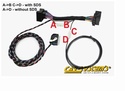
I think the problem is the wiring. You have to have one like this.

Image

Be configured with SDS.
http://www.carsystems.pl/bluetooth-wiri ... id165.html

The coding unit telephone is correct.
Post Reply