Page 1 of 2
OBDeleven
Posted: Wed Dec 18, 2019 7:48 pm
by proalves
I recently got OBDeleven and the idea was to compile all possible changes/modifications with this tool in one place, my previous experience was with VCDS but the version I have doesn't communicate with my Polo GTI 2019+ so I decided to buy OBDeleven.
I think it would benefit everyone here if we took all the necessary steps for the changes, because the little information I gathered rarely applies to our VW Polo, but I believe it is the same and across the VW group.
For now I just changed these parameters ...
Show Blower speed even in Auto
-Select Control unit: 08 Air Conditioning
-Select Long Coding
-Select Blower display in auto operation
-Change from Not activated to activated
Display amount of Fuel left
-Select Control unit: 17 Dash Board
-Select Long Coding
-Select Volume to be replenished:
-Change from No to Yes
Turn off Soundaktor
-Select Control unit: A9 Actuator for Structure Borne Sound
-Adaption
-Change to whatever value you want
Mine changed to 0
Re: OBDeleven
Posted: Wed Dec 18, 2019 8:09 pm
by CarbonChaos
The coding for new polo should be the same or similar to mk7 golf and Passat B8,
as it’s on the MBQ AO platform.
Re: OBDeleven
Posted: Wed Dec 18, 2019 8:59 pm
by proalves
CarbonChaos wrote: Wed Dec 18, 2019 8:09 pm
The coding for new polo should be the same or similar to mk7 golf and Passat B8,
as it’s on the MBQ AO platform.
That's exactly what I said it should look like the same.
By the way does anyone know the steps by OBDeleven to make this change...
https://imgur.com/a/hvgY2lO
I don't know if I'm committing an infraction by placing the link here but I'm not able to send photos through the forum...

Re: OBDeleven
Posted: Thu Dec 19, 2019 6:12 pm
by proalves
Here is the solution to my previous post, it was by trial and error, but I got the solution because I didn't find it on the internet.
Change speedometer appearance in Active Info Display
-Select Control unit: 17 Dash Board
-Adaptation
-look for "tachometer end value"
-Change from 1 to 5
I hope I have somehow helped those like me who wanted to change the look of the speedometer.
Re: OBDeleven
Posted: Fri Dec 20, 2019 9:59 am
by ryanponti
what are the other Speedometer versions? I really like the version 5 i prefer to have more increments on the speed.
Re: OBDeleven
Posted: Fri Dec 20, 2019 3:17 pm
by proalves
Here they are...
https://imgur.com/a/OMDNLAM
I currently have option 5 but possibly change it to 4...
You can also change the color of the speedometer.
Re: OBDeleven
Posted: Sat Dec 28, 2019 10:41 am
by CP_Vaughny
What colours?
Re: OBDeleven
Posted: Sun Jan 05, 2020 2:44 pm
by silverhairs
I think you'll find it's the OBD(2) the (II) are roman numerals for 2. Not trying to be pedantic
.
Re: OBDeleven
Posted: Mon Jan 13, 2020 5:24 pm
by l3rady
silverhairs wrote: Sun Jan 05, 2020 2:44 pm
I think you'll find it's the OBD(2) the (II) are roman numerals for 2. Not trying to be pedantic
.
true, but there are referring to the product called ODBEleven (
https://obdeleven.com/en/). The company thought they were clever seeing that the II looks like the number eleven
Re: OBDeleven
Posted: Sat Jan 25, 2020 12:44 pm
by proalves
Activation Of Rear DRL Tailight
- Select Control unit: 09
- Access authorisation: 31347
- Adaptation
- Außenlicht_Front
- Tagfahrlicht-Dauerfahrlicht_aktiviert_zuaetzlich_Standlicht "active"
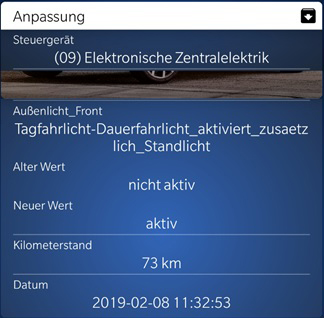
- Activation Of Rear DRL Tailight.jpg (87.66 KiB) Viewed 12148 times
The image is not mine ...
Re: OBDeleven
Posted: Tue Feb 04, 2020 4:59 pm
by GTI Polo Fin
Any luck on deactivating start/stop-system on 2019 Polo GTI?
I have tried to change voltage level to 12V with OBDEleven, but that does not work, since battery voltage is all the time >12.6V.
Any other software solutions?
Re: OBDeleven
Posted: Wed Feb 05, 2020 7:49 am
by proalves
GTI Polo Fin wrote: Tue Feb 04, 2020 4:59 pm
Any luck on deactivating start/stop-system on 2019 Polo GTI?
I have tried to change voltage level to 12V with OBDEleven, but that does not work, since battery voltage is all the time >12.6V.
Any other software solutions?
This is the only method I know and have seen on the internet.
I hadn't applied and tested it because 99% of the time I turn on the ignition and immediately turn off the Start/Stop.
It's practical since my car is equipped with Keyless and I have already acquired the muscle memory for this purpose...
Re: OBDeleven
Posted: Fri Feb 14, 2020 8:55 am
by john M
You should increase the threshold voltage, not decrease it, to disable the stop start, suggest 16V or so.
Re: OBDeleven
Posted: Fri Feb 14, 2020 9:52 am
by RUM4MO
john M wrote: Fri Feb 14, 2020 8:55 am
You should increase the threshold voltage, not decrease it, to disable the stop start, suggest 16V or so.
Exactly!
Re: OBDeleven
Posted: Fri Feb 14, 2020 9:53 am
by monkeyhanger
john M wrote: Fri Feb 14, 2020 8:55 am
You should increase the threshold voltage, not decrease it, to disable the stop start, suggest 16V or so.
Exactly, you need the battery voltage requirement at a level that the car can't achieve.