Page 2 of 4
Re: Help fitting Reverse Camera with RCD330 - Canbus
Posted: Mon Jan 04, 2021 4:19 pm
by Mocro
patil wrote: Mon Jan 04, 2021 3:24 pm
Hello Damon/ Macro..
Can you post the pictures and wiring kit of the reverse camera you people are trying to install. I can't see the camera picture posted earlier.
Thanks.
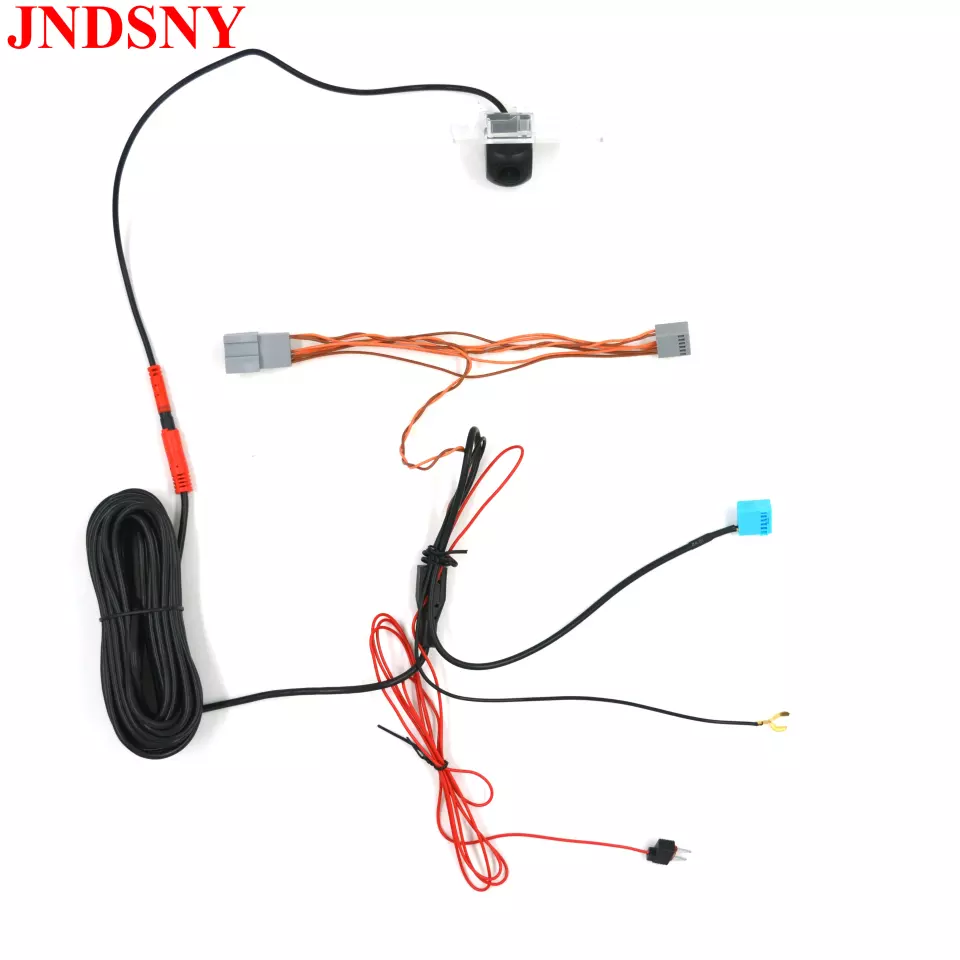
- 1609656142446.png (279.73 KiB) Viewed 3659 times
Re: Help fitting Reverse Camera with RCD330 - Canbus
Posted: Mon Jan 04, 2021 4:19 pm
by Mocro
@ iichel
I coded that I have Rear view camera, when i turn off byte 19 bit 4 then I will see the OPS.
This is the fault code.
1 Fault Found:
6720 - Rear View Camera
B1102 31 [009] - No Signal
Confirmed - Tested Since Memory Clear
Freeze Frame:
Fault Status: 00000001
Fault Priority: 3
Fault Frequency: 1
Reset counter: 100
Mileage: 64470 km
Date: 2021.01.03
Time: 12:11:45
Voltage terminal 30: 11.1 V
Re: Help fitting Reverse Camera with RCD330 - Canbus
Posted: Mon Jan 04, 2021 4:51 pm
by iichel
i guess you'll have to figure out why the radio isn't receiving a signal from the rvc
Re: Help fitting Reverse Camera with RCD330 - Canbus
Posted: Mon Jan 04, 2021 5:02 pm
by Mocro
Damon wrote: Sun Dec 27, 2020 5:42 pm
Okay got it working at front of car.
However I’ve put the bracket with the camera in the registration light but how do feed the cable off the camera into the boot from the bracket?
I push the cable through but can’t seee where it’s coming out?
Remove this
You will see a round rubber thing with wiring remove the rubber
Put a cable in the license plate light holder
You will see the cable is coming to the rubber whole, its little bit difficult but the cable is coming to the rubber whole
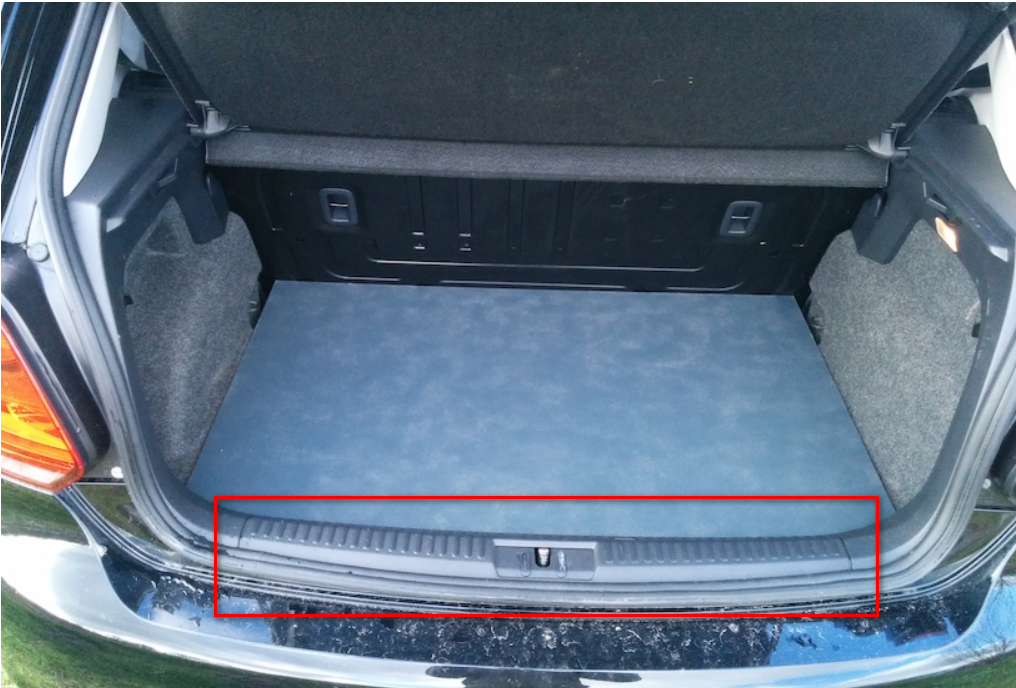
- 43243224.png (1.32 MiB) Viewed 3646 times
Re: Help fitting Reverse Camera with RCD330 - Canbus
Posted: Mon Jan 04, 2021 5:09 pm
by patil
Thanks for the picture

Please do as I suggest and tell me the results.
1. Please feed the camera power with +30
2. Ground connect wherever you want, but I suggest you to connect ground in front eg.. steering column ground point.
3. Connect can high and can low to your quadlock can wires as iichel suggested.
4. Coding is
not required for such type of cameras.
5. In address 10, select
automatic in ops display.
This should set everything right.
Good luck
Re: Help fitting Reverse Camera with RCD330 - Canbus
Posted: Mon Jan 04, 2021 5:22 pm
by Mocro
iichel wrote: Mon Jan 04, 2021 4:51 pm
i guess you'll have to figure out why the radio isn't receiving a signal from the rvc
Yes iknow, I measured the cable up to the plug of the camera. There is coming power.
it is possible that i am not getting video through canbus cable?
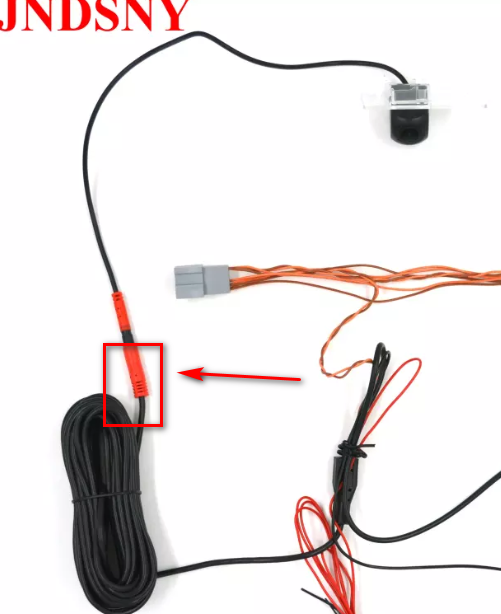
- 2021-01-04_181459.png (164 KiB) Viewed 3640 times
Re: Help fitting Reverse Camera with RCD330 - Canbus
Posted: Mon Jan 04, 2021 5:25 pm
by Mocro
patil wrote: Mon Jan 04, 2021 5:09 pm
Thanks for the picture
Please do as I suggest and tell me the results.
1. Please feed the camera power with +30
2. Ground connect wherever you want, but I suggest you to connect ground in front eg.. steering column ground point.
3. Connect can high and can low to your quadlock can wires as iichel suggested.
4. Coding is
not required for such type of cameras.
5. In address 10, select
automatic in ops display.
This should set everything right.
Good luck
But I have a 6C when i dont coded byte19 bit 4 i dont see anything only the ops
Where in address 10 can I find the option automatic OPS?
I will do it tommorow, thank you
I will let you know the result.
Re: Help fitting Reverse Camera with RCD330 - Canbus
Posted: Mon Jan 04, 2021 5:42 pm
by iichel
Video is not transmitted through the canbus. It needs the canbus for the dynamic lines. The video is transmitted to the blue block of the quadlock.
Re: Help fitting Reverse Camera with RCD330 - Canbus
Posted: Mon Jan 04, 2021 5:45 pm
by patil
Mocro wrote: Mon Jan 04, 2021 5:25 pm
patil wrote: Mon Jan 04, 2021 5:09 pm
Thanks for the picture
Please do as I suggest and tell me the results.
1. Please feed the camera power with +30
2. Ground connect wherever you want, but I suggest you to connect ground in front eg.. steering column ground point.
3. Connect can high and can low to your quadlock can wires as iichel suggested.
4. Coding is
not required for such type of cameras.
5. In address 10, select
automatic in ops display.
This should set everything right.
Good luck
I will do it tommorow, thank you
I will let you know the result.
Slight correction to my suggestion.
I completely overlooked that you have rcd330 installed. After completing the wiring part, the camera
must be coded.
Go to address 56, and enable
byte3,
bit6
Also remember, the power supply to camera
must be +30 and not +15.
My sincere apologies for my suggestion number 4

Re: Help fitting Reverse Camera with RCD330 - Canbus
Posted: Mon Jan 04, 2021 5:46 pm
by iichel
Patil, he has a Discover Media MQB in his Polo 6C, not an RCD330.
Re: Help fitting Reverse Camera with RCD330 - Canbus
Posted: Mon Jan 04, 2021 5:49 pm
by Mocro
I put the ACC to fuse 19
Re: Help fitting Reverse Camera with RCD330 - Canbus
Posted: Mon Jan 04, 2021 6:07 pm
by patil
iichel wrote: Mon Jan 04, 2021 5:46 pm
Patil, he has a Discover Media MQB in his Polo 6C, not an RCD330.
Oh I got confused iichel. Thanks for pointing it out

So here is the coding for both Damon & Mocro
For RCD 330: address 56,
byte3,
bit6 should be enabled.
For MIB2 Discover media: address 5F:
byte19,
bit4 should be enabled.
Wiring part applies same for both.

Re: Help fitting Reverse Camera with RCD330 - Canbus
Posted: Mon Jan 04, 2021 6:15 pm
by patil
Mocro wrote: Mon Jan 04, 2021 5:25 pm
Where in address 10 can I find the option automatic OPS?
Look in adaptation channels of address 10.
After complete installation of wiring, enable byte19, bit4
Re: Help fitting Reverse Camera with RCD330 - Canbus
Posted: Mon Jan 04, 2021 6:49 pm
by patil

Hope this helps.

Re: Help fitting Reverse Camera with RCD330 - Canbus
Posted: Sun Jan 10, 2021 4:33 pm
by Mocro
I measured the cable with multi meter and the cable is ok, I also do not see other fault codes except the camera.
I plugged an other camera this also doenst work, with an other plug cable (blue).
Do you guys have some ideas??
